README
RNG example
1 Brief
The function of this code is that the program automatically gets the random number between 0 and 9 and displays it on the serial port host computer. After pressing the KEY0 key, a 32-bit random number is obtained and displayed on the host computer of the serial port.
2 Hardware Hookup
The hardware resources used in this experiment are:
- LED - PA8
- USART1 - PA9\PA10
- KEY - KEY0(PC13)
- RNG
The RNG used in this experiment is an on-chip resource of STM32H503, so there is no corresponding connection schematic.
3 STM32CubeIDE Configuration
We copy the 11_USMART project and name both the project and the.ioc file 19_RNG.Next we start the DAC configuration by double-clicking the 19_RNG.ioc file.
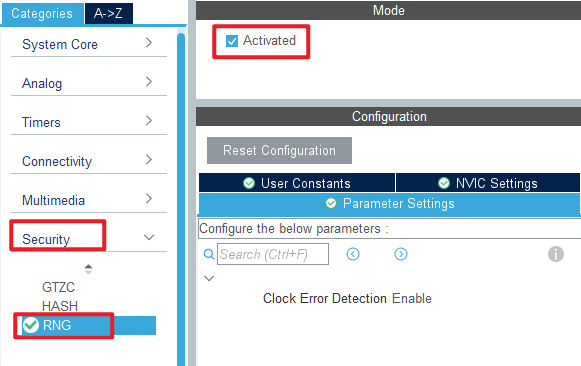
Configure the RNG as shown in the following screenshot:
Click File > Save, and you will be asked to generate code.Click Yes.
code
rng.c
uint32_t rng_get_random_num(void)
{
    uint32_t randomnum;

    HAL_RNG_GenerateRandomNumber(&hrng, &randomnum);

    return randomnum;
}

/**
 * @brief   Gets a range of random numbers
 * @param   min : The minimum value
 * @param   max : The maximum value
 * @retval  gets the random number (32bit)
 */
uint32_t rng_get_random_range(int min, int max)
{
    uint32_t randomnum;

    HAL_RNG_GenerateRandomNumber(&hrng, &randomnum);

    return randomnum % (max - min + 1) + min;
}
This code provides two functions to get a random number, one is to get the 32-bit random number generated by the RNG directly, and the other is to process the 32-bit random number generated by the RNG to get a random number in the specified range.
usmart_port.c
The usmart_nametab array is modified in this file to facilitate the validation of RNG related functions as follows:
struct _m_usmart_nametab usmart_nametab[] =
{
#if USMART_USE_WRFUNS == 1      /* If read and write operations are enabled */
    {(void *)read_addr, "uint32_t read_addr(uint32_t addr)"},
    {(void *)write_addr, "void write_addr(uint32_t addr,uint32_t val)"},
#endif
    {(void *) rng_get_random_num, "uint32_t rng_get_random_num(void)"},
    {(void *) rng_get_random_range, "uint32_t rng_get_random_range(int min, int max)"},
};
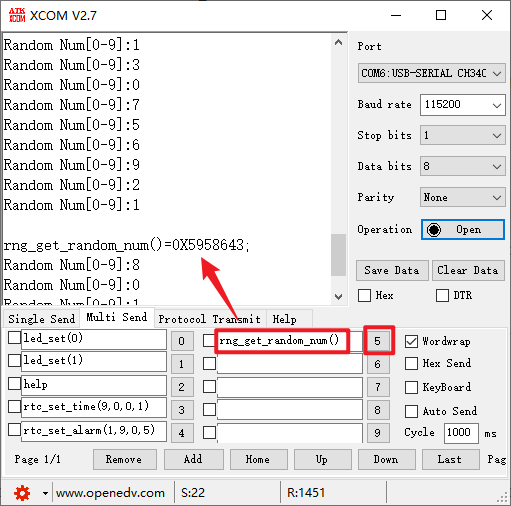
The correlation function of RNG is added to USMART, so that RNG can be directly set to generate random numbers through the serial port.
main.c
int main(void)
{
  /* USER CODE BEGIN 1 */
  uint8_t key;
  uint32_t random;
  uint8_t t = 0;
  /* USER CODE END 1 */

  /* MCU Configuration--------------------------------------------------------*/

  /* Reset of all peripherals, Initializes the Flash interface and the Systick. */
  HAL_Init();

  /* USER CODE BEGIN Init */

  /* USER CODE END Init */

  /* Configure the system clock */
  SystemClock_Config();

  /* USER CODE BEGIN SysInit */

  /* USER CODE END SysInit */

  /* Initialize all configured peripherals */
  MX_GPIO_Init();
  MX_ICACHE_Init();
  MX_USART1_UART_Init();
  MX_TIM2_Init();
  MX_RNG_Init();
  /* USER CODE BEGIN 2 */
  stm32h503cb_show_mesg();
  /* USER CODE END 2 */

  /* Infinite loop */
  /* USER CODE BEGIN WHILE */
  while (1)
  {
    key = key_scan(0);

    if (key == KEY0_PRES)   /* Get the random number and send it to the serial port */
    {
        random = rng_get_random_num();
        printf("Random Num:%d\r\n", (int)random);
    }

    if ((t % 20) == 0)      /* Get the random number between 0 and 9 and send it to the serial port */
    {
        LED_TOGGLE();
        random = rng_get_random_range(0, 9);
        printf("Random Num[0-9]:%d\r\n", (int)random);
    }

    t++;
    HAL_Delay(10);   		 /* delay 10ms */
    /* USER CODE END WHILE */

    /* USER CODE BEGIN 3 */
  }
  /* USER CODE END 3 */
}
4 Running
4.1 Compile & Download
After the compilation is complete, connect the DAP and the Mini Board, and then connect to the computer together to download the program to the Mini Board.
4.2 Phenomenon
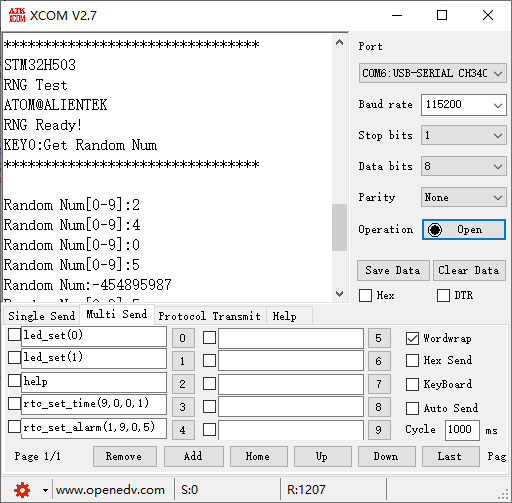
Press the reset button to restart the Mini Board, observe the LED flashing on the Mini Board, open the serial port and the host computer ATK-XCOM can see the prompt information of the experiment, indicating that the code download is successful. The host of the serial port will constantly display a random number from 0 to 9, and press the KEY0 button to generate a random number of 32 bits, as shown in the following figure: